
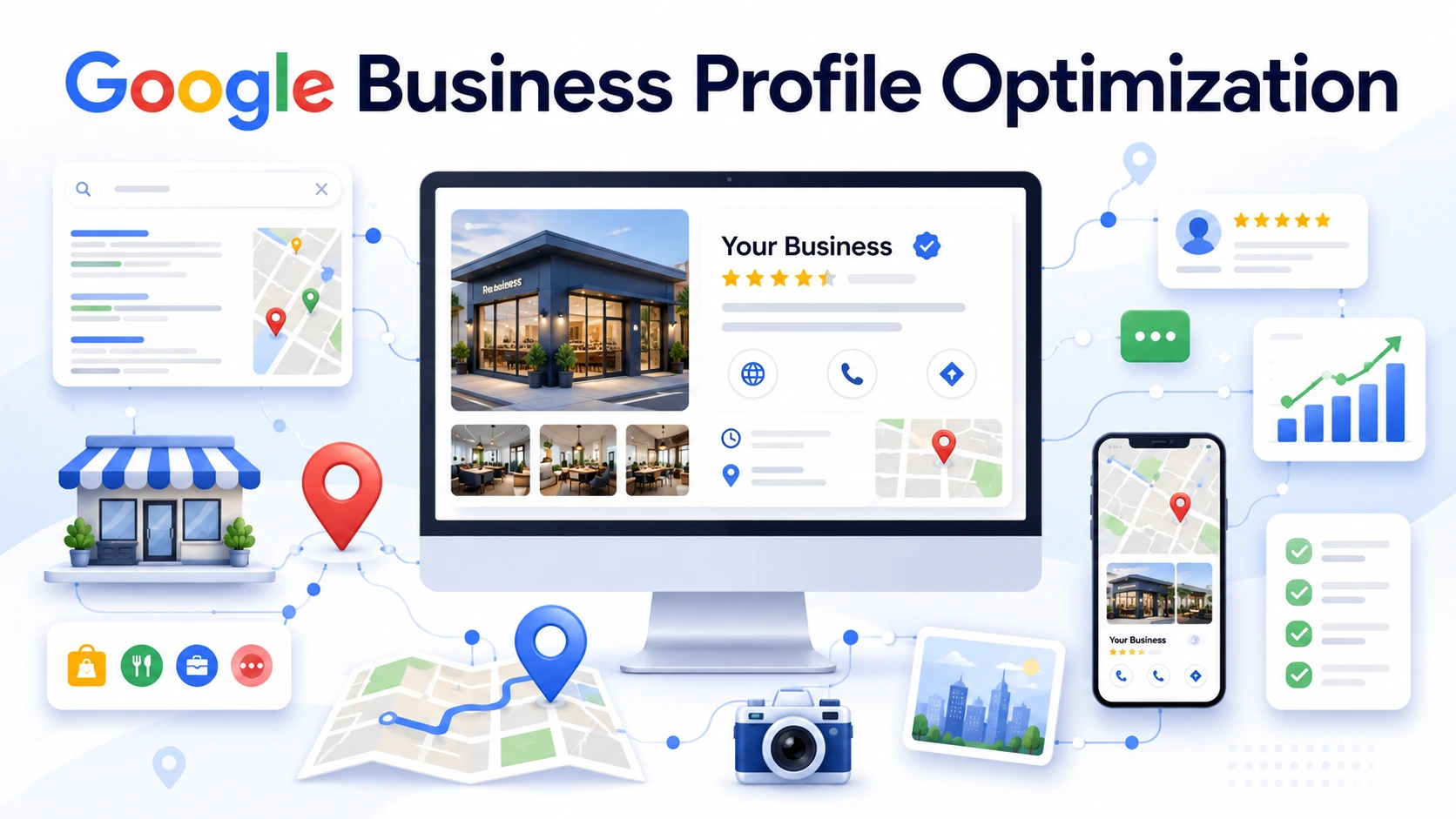
Many local businesses offer excellent products or services but still struggle to appear when nearby customers search on Google. If your competitors consistently show up in Google Maps while your business doesn’t, your Google Business Profile (GBP) could be the missing piece.
Google Business Profile optimization helps improve your visibility in local search results, making it easier for potential customers to find, contact, and visit your business. However, simply creating a profile isn’t enough. Google’s local ranking algorithm considers several factors when deciding which businesses appear in Google Maps.
In this guide, you’ll learn how to optimize your Google Business Profile using proven best practices, understand the ranking factors that influence Google Maps visibility, avoid common optimization mistakes, and measure whether your efforts are driving real business results.
Key Takeaways
- A fully refined Google Business Profile increases your presence in Google Search and Google Maps.
- Entire business information, correct categories, quality photos, and daily updates improve profile performance.
- Customer reviews and considerate responses build trust while helping in local search visibility.
- Constant business information across your website and local citations strengthens reliability.
- Google Business Profile Insights helps you evaluate performance and identify possibilities for enhancement.
- Google Business Profile works best as part of a larger local SEO approach.
What Is Google Business Profile Optimization?
Google Business Profile optimization is the process of improving your business listing so it shows up more prominently in Google Search and Google Maps. It includes completing every section of your profile, maintaining accurate information, reassuring real customer reviews, publishing updates, and keeping your listing active.
When someone searches for services like “ Mexican restaurant in San Diego” or “Veterinary clinic in Boston,” Google may show local business profiles before traditional organic search outcomes. A well-maintained profile helps power customers rapidly decide whether your business satisfies their needs.
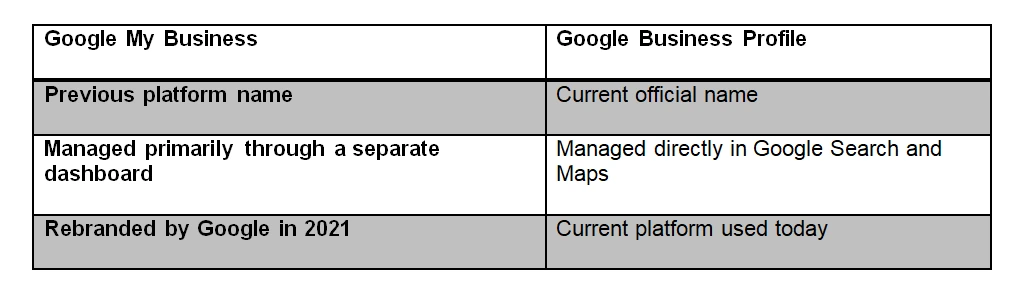
Google Business Profile is the upgraded name for Google My Business. While the branding changed, its purpose remains similar: helping businesses oversee their presence across Google Search and Google Maps.
Why Is Google Business Profile Optimization Important for Local SEO?
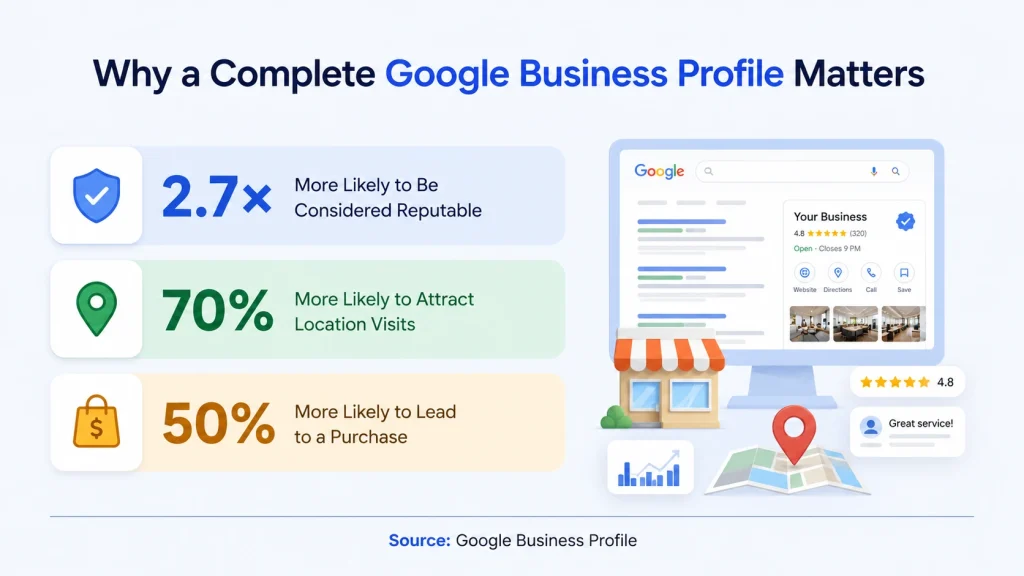
Google Business Profile optimization increases your chances of appearing in local search outcomes when local customers are potentially seeking your services.
Google Business Profile works best along with a complete local SEO for small businesses strategy that enhances your website, citations, and local authority.
When someone searches for a neighboring business, Google usually shows the Local Pack before conventional natural results. Appearing in this section can beneficially increase your visibility because it’s one of the first areas users recognize.
How Does Google Rank Google Business Profiles?
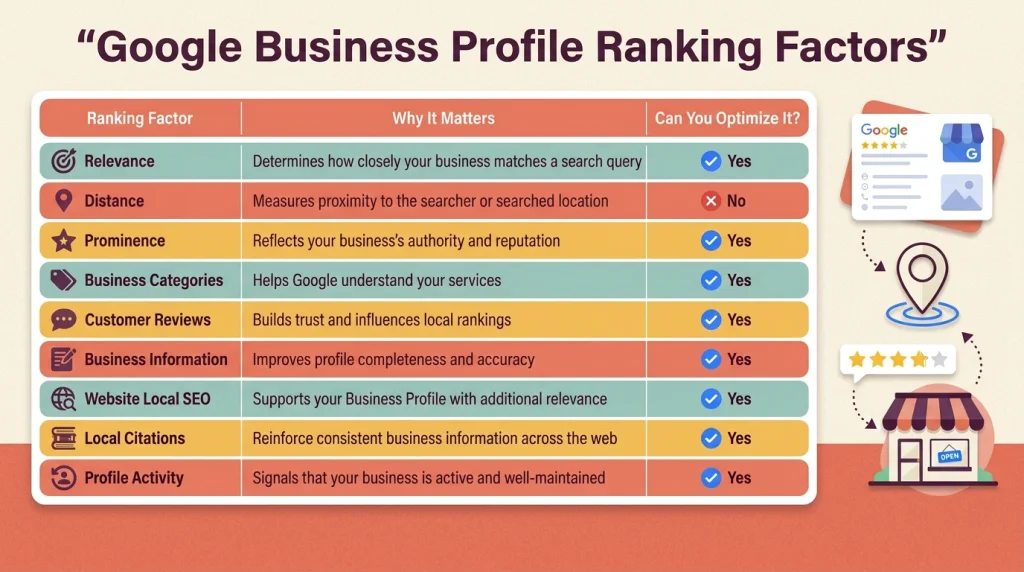
Google ranks business profiles having three primary factors: relevance, distance, and prominence. Together, these indications help Google define which industries are most useful for a specific local search.
Relevance
- Relevance evaluates how nearly your business profile matches what a user is searching for.
- Google examines several features, including your primary and secondary business categories, business description, services, products, and other profile details, to get what your business delivers.
- For example, if someone searches for roof repair in Tampa, a roofing contractor with correct categories, detailed service listings, and relevant profile information has more chances to appear than a profile with incomplete or useless details.
- Enhancing relevance begins with providing whole, accurate information rather than adding too many keywords.
Distance
- Distance cites how close your business is to the location used in the search.
- If a user includes a city or neighborhood in their search, Google thinks about businesses within or near that area. When no location is stated, Google estimates nearness based on the searcher’s device location.
- Upholding an accurate address and service area aids Google in linking your business with the locations you serve.
Prominence
- Prominence reflects how well-known and trusted your business shows online.
- Google estimates signals such as customer reviews, ratings, backlinks, local citations, website authority, business mentions, and your global online reputation. Businesses with stronger reliability usually perform better in competitive local markets.
- This doesn’t mean the largest businesses always rank first. Smaller businesses with active profiles, consistent information, positive customer feedback, and strong local SEO can compete essentially against larger competitors.
These local ranking signals are just one part of the different types of SEO businesses should understand when making long-term search visibility.
How Do You Optimize a Google Business Profile?
Google Business Profile optimization is a continuous process, not a single-time project. Whether you’re making a new profile or doing better with a present one, concentrate on the following proven methods.
Google Business Profile optimization is a continuous process that works best as part of a broader digital marketing strategy.
1. Claim and Verify Your Business
- The first step is to request ownership of your Google Business Profile and the whole Google verification process.
- Verification states that you manage the business and reveal features such as answering reviews, publishing Google Posts, editing business information, and accessing performance insights.
- If your business already appears on Google, check whether an ownerless profile exists before making a new listing. Creating multiple profiles can mix up Google and negatively impact your local visibility.
- Once verified, review your profile on a daily basis to make sure that all information remains precise.
Learn how to verify your Google Business Profile using Google’s official guidelines.
2. Complete Every Profile Section
A complete business profile helps customers make logical decisions while giving Google the information it needs to examine your business.
Include every related detail, such as:
- Business name.
- Address.
- Phone number.
- Website URL.
- Business hours.
- Services.
- Products.
- Business description.
- Attributes.
- Service areas (if applicable).
Avoid leaving applicable fields blank. A complete profile delivers a stronger relevance indicator than one with only basic information.
3. Choose the Right Business Categories
- Your primary business category is one of the powerful relevance signals Google applies to decide when your profile should appear.
- Select the category that best shows your primary service. Then add secondary categories only when they correctly reflect additional services you really provide.
- Adding irrelevant categories in an attempt to rank for more searches usually has the opposite impact and may weaken your profile’s relevance.
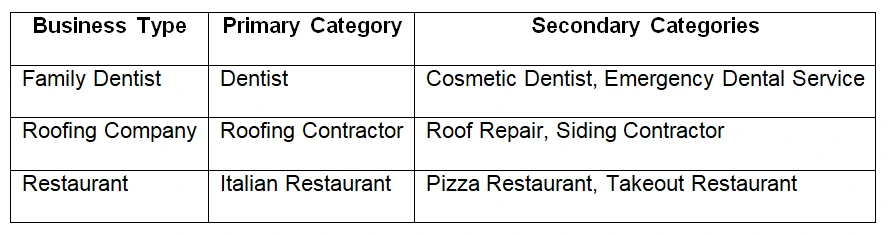
Instead of trying to show up for every search, concentrate on the specific services your customers seek. Targeting long-tail keywords that match your business offerings usually attracts more qualified local searches and improves relevance.
4. Write an SEO-Friendly Business Description
Your business description should clearly explain who you are, what you offer, and the areas you serve. Rather than filling it with keywords, write naturally for potential customers.
A strong description usually includes:
- Your primary services.
- Target customers.
- Service areas.
- Years of experience (if applicable).
- Unique strengths or specialties.
Using insights from proper keyword research helps you naturally include the terms active consumers actually search for.
5. Add High-Quality Photos and Videos
Visual content plays a significant role in customer trust. Businesses with current, high-quality photos often receive more engagement because customers can better understand what to foresee before visiting.
Consider adding:
- Exterior photos.
- Interior photos.
- Team members.
- Products.
- Completed projects.
- Before-and-after images.
- Short videos showcasing your business.
6. Publish Google Posts Regularly
Google Posts allow you to contribute updates directly on your Business Profile. While posts alone won’t ensure higher rankings, they show that your business is active and engaged.
Useful post ideas include:
- Special promotions.
- Seasonal offers.
- New services.
- Community involvement.
- Company announcements.
- Educational tips.
- Holiday business hours.
Goal: to publish new posts consistently rather than posting some updates at once and being inactive for months.
If you’re struggling to rank higher in Google Maps or don’t have time to manage ongoing optimization, our team can help.
Contact us today for a free consultation and personalized local SEO recommendations.
7. Add Products and Services
- Many businesses neglect the Products and Services sections, yet they provide a precious framework for both Google and active customers.
- Register your primary offerings using clear names and helpful descriptions.
- For service-based industries, explain what each service involves instead of simply listing its name.
8. Enable Messaging
If messaging is available for your business category and you have the assets to reply promptly, enabling this feature provides customers another easy way to contact you.
Many people favor sending a quick message instead of making a phone call, specifically when comparing several local businesses.
9. Add Questions & Answers
The Questions & Answers section allows businesses to intentionally answer common customer questions before they’re asked.
Some useful questions include:
- Do you offer free estimates?
- What areas do you serve?
- Do you provide same-day appointments?
- What payment methods do you accept?
- Are weekend appointments available?
Delivering clear answers enhances customer confidence while decreasing repetitive queries.
10. Keep Business Hours Updated
Incorrect business hours are one of the quick ways to lose customer belief.
Upgrade your profile whenever:
- Holiday hours change.
- Seasonal schedules change.
- Emergency closures occur.
- Business hours are extended.
- Locations temporarily close.
Correct operating hours increase the customer experience and help hinder negative reviews caused by sudden closures.
11. Get More Reviews and Respond to Them
Customer reviews impact both purchasing decisions and local search presence.
Instead of asking for reviews only sometimes, integrate review requests into your normal customer follow-up process.
For example, request feedback after:
- Completed appointments.
- Successful installations.
- Finished projects.
- Positive customer interactions.
Answer to every review whenever possible, including negative ones.
12. Maintain NAP Consistency
NAP stands for Name, Address, and Phone Number.
Your business information should remain continuous across:
- Your website.
- Google Business Profile.
- Online directories.
- Local citation websites.
- Social media profiles.
Even small differences, such as abbreviations, outdated phone numbers, or old addresses, can create confusion for search engines.
13. Track Performance with Google Business Profile Insights
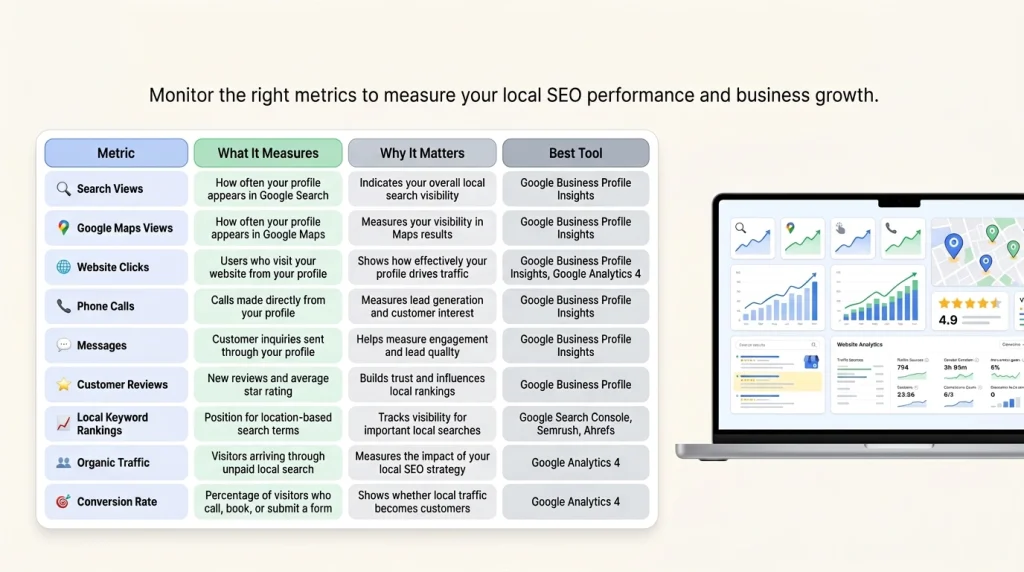
Use Google Business Profile Insights to get how customers engage with your listing.
Monitor metrics such as:
- Search views.
- Google Maps views.
- Website clicks.
- Phone calls.
- Direction requests.
- Messages.
- Popular search queries.
Review these insights monthly to detect trends and chances for improvement.
If website clicks increase but phone calls decline, for example, it may show that your profile information or calls to action need improvement.
Learn how Google measures your business profile performance.
Google Business Profile Optimization Checklist
Use this checklist to ensure that your profile chases current Google Business Profile best practices.
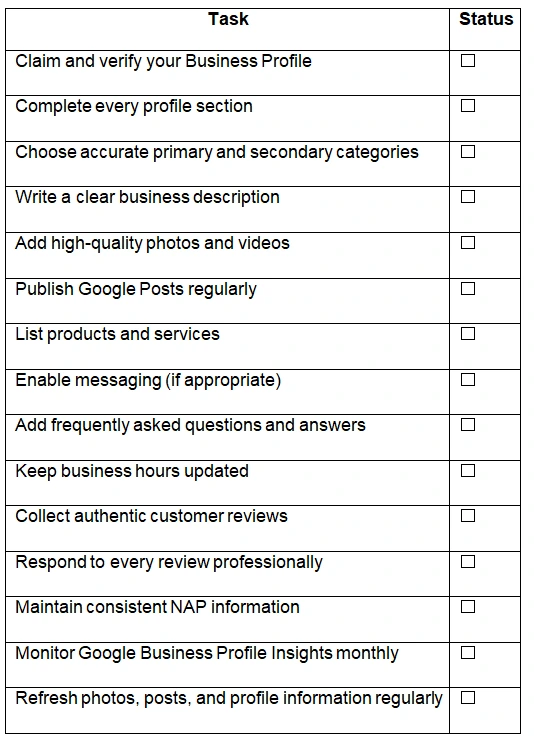
Completing this checklist won’t automatically move your business to the top of Google Maps. However, it builds a strong foundation for good visibility, improved customer trust, and stronger local SEO.
See our SEO Services to build a long-term strategy that improves both Google Maps visibility and organic search performance.
Why Isn’t Your Google Business Profile Ranking?
If your profile isn’t shown in Google Maps, one or more ranking signals may be weaker than those of competing companies. Incomplete information, inconsistent business details, limited online authority, or low customer engagement can all reduce your visibility.
Most common reasons businesses struggle to rank in local search
1. Incomplete Business Profile
Check every applicable section of your profile. Missing information makes it tough for Google and potential customers to get your business.
2, Wrong Business Category
Choosing a wrong primary category is a common mistake that can majorly affect local rankings.
3. Weak Website Signals
Your business profile and website work together. Even with a well-optimized profile, a poorly optimized website can restrict your local search output. Improving your website’s on-page SEO aids search engines in better understanding your services and helps stronger local rankings.
4. Low Online Authority
Creating authority takes time. Publishing helpful content, earning links from trustworthy local organizations, and keeping up consistent business information all lead to stronger long-term visibility.
5. Poor Reviews or Limited Review Activity
Concentrate on earning genuine reviews from pleased customers and answer professionally to both positive and negative feedback.
6. Duplicate Business Listings
Search for your business name on Google and Google Maps to detect duplicate listings. If duplicates exist, request their removal or integrate them through Google’s support process.
7. Inconsistent NAP Information
Your Name, Address, and Phone Number (NAP) should stay identical across every online environment.
8. Low Profile Activity
If your profile hasn’t been updated in months, rivals that daily publish Google Posts, respond to reviews, update business information, and add new photos may have a benefit.
What Are the Most Common Google Business Profile Optimization Mistakes?
Avoiding these problems helps maintain a trustworthy profile while enhancing your chances of appearing in Google Search and Google Maps.
- Keyword Stuffing: Adding too many keywords to your business name or description doesn’t enhance rankings and may break Google’s guidelines.
- Buying or Posting Fake Reviews: True client reviews make long-term belief. Purchased reviews or reviews from fake accounts violate Google’s policies and may result in review removal or profile suspension.
- Choosing Incorrect Business Categories: Choosing categories simply because they have higher search volume usually reduces relevance.
- Ignoring Customer Reviews: Leaving reviews unanswered can make the impression that customer feedback isn’t vital.
- Outdated Business Information: Old phone numbers, incorrect hours, closed holiday schedules, or discontinued services frustrate clients and can result in negative reviews.
- Using Poor-Quality Images: Blurry, outdated, or generic stock photos don’t correctly represent your business.
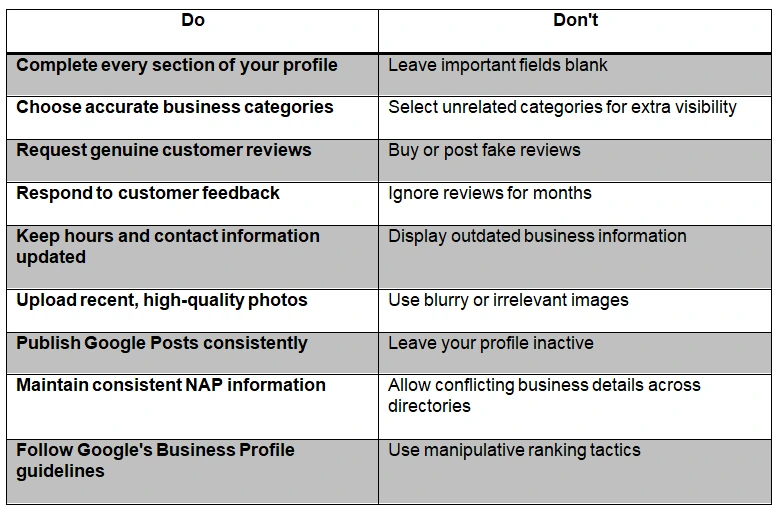
Google Business Profile Optimization: Do vs. Don’t
Following Google’s recommended proven methods makes a stronger base than trying quick ranking shortcuts that may lead to damages.
How Can You Improve Your Google Business Profile Rankings Even Further?
Once you’ve optimized the fundamentals, strengthen the external signals that help your business profile.
1. Build High-Quality Local Citations
Local citations are mentions of your business’s name, address, and phone number on trusted online directories and industry-specific websites.
Concentrate on trustworthy citation sources rather than yielding your information to hundreds of low-quality directories.
2. Earn Local Backlinks
Backlinks remain an important indicator of authority.
Locally relevant links reinforce your website’s authority, which can indirectly help your Google Business Profile rankings.
3. Optimize Your Website for Local SEO
Your business profile presents best when assisted by a well-optimized website.
Key progress include:
- Creating location-specific service pages.
- Optimizing title tags and meta descriptions.
- Adding structured data where appropriate.
- Improving page speed.
Helpful content published throughout your content marketing funnel can target local visitors before they’re prepared to contact your business.
Learn how our Content Marketing Services help businesses make content that improves local visibility and drives conversions.
4. Create Location Pages
If your business serves different cities or has many physical locations, make devoted location pages instead of focusing every city on one page.
Each location page should include:
- Unique content.
- Local services.
- Contact information.
5. Keep Your Profile Active
Regular activity warns that your business is operating and engaged.
Simple continuous updates include:
- Publishing Google Posts.
- Responding to reviews.
- Refreshing photos.
- Answering customer questions.
Publishing seasonal Google Posts about holiday hours, limited-time offers, new services, or community events also maintains your profile’s relevance.
See how our Social Media Marketing Services can support your local marketing efforts.
How Long Does Google Business Profile Optimization Take?
Most businesses begin seeing progress within 30 to 90 days, although results depend on your competition, location, profile completeness, consistency, and the power of your overall local SEO.
If you’re also curious how long SEO takes, website rankings and local visibility usually improve gradually as Google collects stronger trust signals.
Businesses in highly competitive industries or large cities may need more time.
Google doesn’t suddenly reward profile updates. Instead, it continuously examines signals such as profile correctness, client reviews, website quality, local citations, and business activity.
If you don’t observe immediate improvements, continue tracking your performance over many months and adapt your technique based on insights from Google Business Profile Insights and your website analytics.
How Do You Know If Your Google Business Profile Is Performing Well?
The best way to estimate success is by tracking customer actions rather than rankings alone.
Google Business Profile Insights present how people find and engage with your listing.
Integrated with tools like Google Analytics 4, Google Search Console, Semrush, or Ahrefs, it delivers a clearer picture of your local SEO performance.
As AI-powered search grows, integrating local SEO with AI search optimization (GEO) can increase your visibility across modern search experiences.
Key Metrics to Track
Review these metrics monthly to detect trends and refine your optimization strategy.
Ready to Get Found on Google Maps?
A fully optimized Google Business Profile can produce more calls, website visits, and local customers, but only when it’s maintained consistently.
Contact our team to discover how we can help improve your local visibility and grow your business.
Final Thoughts
Local search is continuously evolving, so daily updates and continuous optimization are necessary to stay competitive and target nearby customers.
For most local companies, investing in Google Business Profile optimization confirms that SEO is worth it for small businesses looking for effective growth.
If you’re seeking to reinforce your overall local SEO strategy along with your Google Business Profile, consider working with experienced professionals who can identify possibilities, fix technical issues, and help your business create maintainable local visibility.
FAQs
Is Google Business Profile optimization free?
Yes. Creating, verifying, and optimizing a Google Business Profile is free. You may select to invest in professional local SEO services or tools, but the profile itself doesn’t charge anything.
Why isn’t my business showing on Google Maps?
Your business may not show because the profile hasn’t been verified, contains incomplete information, uses incorrect categories, has inconsistent business details, or faces strong local competition.
How often should I update my Google Business Profile?
Check your profile at least once a month and update it whenever your business information changes.
Does Google Business Profile help SEO?
Yes. Although it doesn’t directly enhance your website’s organic rankings, a well-optimized Google Business Profile strengthens your local SEO by improving presence in Google Search and Google Maps.
Can I optimize my Google Business Profile without a website?
Yes. A Google Business Profile can appear in local search output without a website. However, a well-optimized website delivers Google with additional information about your business and gives clients a place to learn more or convert after discovering your profile.