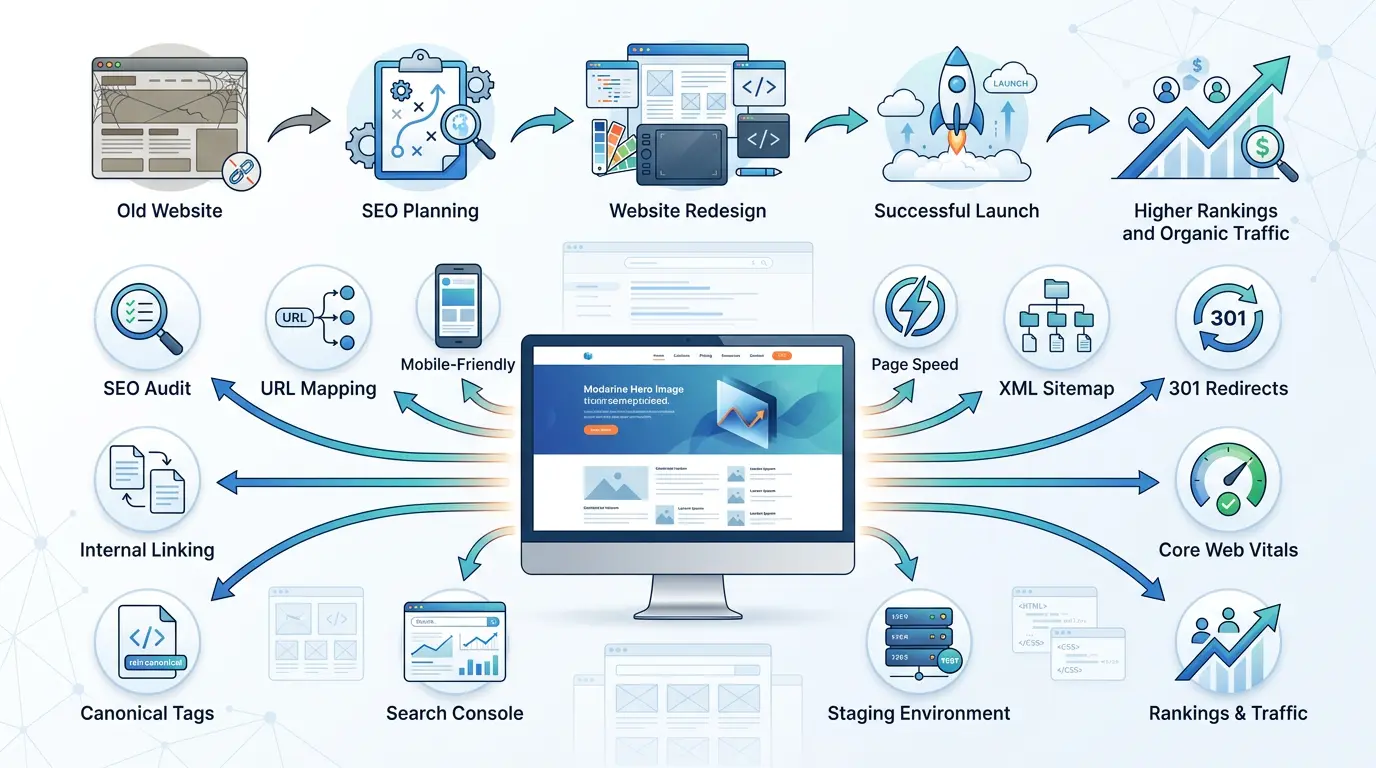
Redesigning your website can improve your brand, user experience, and conversions, but it can also hurt your search rankings if SEO is neglected. Missing redirects, broken links, and poor migration planning can quickly lead to lost organic traffic, even if your new website looks more preferable than ever.
That’s why website redesign SEO should be part of every stage of the redesign process, not just the final launch checklist. In this guide, you’ll learn the essential SEO steps to take before, during, and after a redesign, along with practical best practices to help protect your rankings and traffic.
What Is Website Redesign SEO?
Website redesign SEO is the process of protecting and improving a website’s organic search performance while updating its design, structure, content, or technology.
In order for search engines to continue efficiently crawling, indexing, and ranking your pages, it ensures that crucial SEO components remain the same before, during, and after a redesign.
Redesigning a website typically involves much more than just changing layouts or colors.
Businesses may:
- Shift to a new CMS such as WordPress.
- Upgrade their website architecture.
- Improve mobile responsiveness.
- Merge or remove pages.
- Change URL structures.
- Improve page speed.
- Refresh website content.
- Add new functionality.
Consider SEO as the framework that protects your current search equity and helps your redesigned website perform even better over time, rather than as a separate job.
Does Website Redesign Affect SEO?
Yes. A website redesign can significantly affect SEO, either positively or negatively, depending on how it is planned and executed. In order to fully understand your website, search engines rely on its URLs, internal links, content, metadata, and technical signals. Rankings may shift when these factors do.
Ranking losses are not always the outcome of a redesign alone. Issues usually happen when crucial SEO materials are mistakenly deleted or altered without careful planning.
Some of the most common problems include the following:
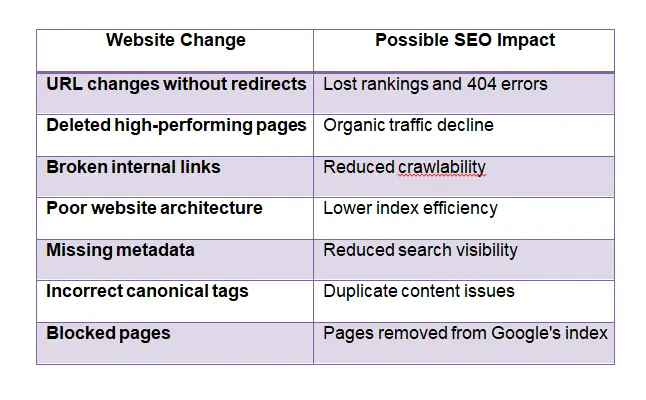
Many companies believe that a redesigned website will be easily understood by Google. In actuality, Google needs time to rebuild its understanding of the site’s structure, process redirection, analyze updated content, and index new pages.
Why SEO Must Be Part of Your Website Redesign from Day One?
Every website redesign should start with SEO, as many search-related decisions are costly or impossible to correct after launch. While avoiding technical problems that may affect long-term visibility, early planning helps maintain current rankings.
Many redesign projects follow this sequence:
Design → Development → Launch → “Let’s check SEO.”
Alas, that’s often too late.
Integrating SEO before website redesign offers several advantages:
- Protects valuable organic traffic and existing rankings.
- Preserves backlinks pointing to older URLs.
- Maintains crawlability and site hierarchy.
- Helps developers build SEO-friendly templates.
- Prevents unnecessary rework before launch.
- Supports better page speed optimization and Core Web Vitals.
- Lowers the probability of expensive migration mistakes.
Three equally important goals should be balanced in a successful website redesign strategy:
- Boost consumers’ visual experience.
- Support business and conversion objectives.
- Maintain and improve organic search results.
Redesign efforts have a much greater chance of success when these objectives are in line from the beginning with no compromise on years of SEO advancement.
11 Proven Website Redesign SEO Steps to Protect Rankings and Traffic
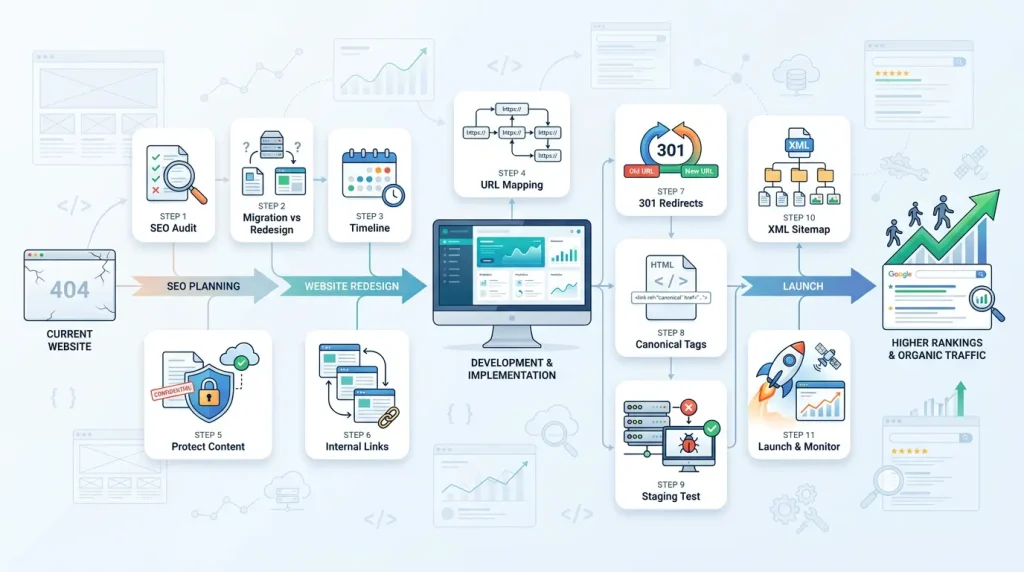
1. Perform an SEO Audit Before Website Redesign
Before any changes are made, an SEO audit gives you a comprehensive view of how well your website is performing right now. It defines which sites, technical assets, backlinks, and keywords should be maintained during the redesign process.
A complete audit should inspect the following:
- Top-ranking keywords.
- Indexed URLs.
- Backlink profile.
- Existing metadata.
- Internal linking strategy.
- Crawl errors.
- XML sitemap.
- Canonical tags.
- Mobile usability.
Additionally, this is a great opportunity to plan upcoming improvements. For example, If your audit finds slow-loading templates or duplicate metadata, you can fix these problems during the redesign instead of after launch.
2. Website Migration vs Website Redesign
While a website migration alters essential technical components like domains, platforms, URLs, or hosting, a website redesign changes the appearance or functionality of a website. Many projects involve both, which increases SEO complexity.
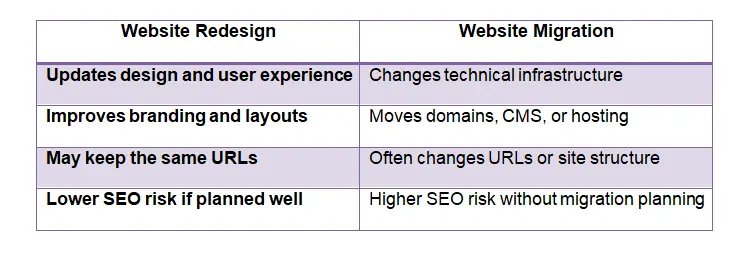
For example, a redesign refers to updating the layout of your website while maintaining the same URLs. But switching from an outdated CMS to WordPress and rearranging page URLs involves a migration as well as a redesign.
If you’re planning a website redesign or migrating to a new platform, investing in pur professional website development and designing helps ensure your new site is built with both SEO and user experience in mind.
3. Create a Website Redesign Timeline
SEO tasks are kept in line with design and development goals by using a planned timeline for website redesign. It ensures that every phase of the project has search-focused goals, rather than delaying SEO till the last week.
An effective timeline typically includes:
- Initial SEO audit.
- Website architecture planning.
- Content inventory and migration.
- URL mapping.
- Development on a staging environment.
- Technical SEO validation.
- Pre-launch testing.
- Website launch.
- Post-launch monitoring.
Every stakeholder, from developers to designers, may handle SEO requirements before they become costly issues by planning forward.
4. Plan URL Mapping Before Launch
The process of linking each current URL with its equivalent page on the new website is known as URL mapping. It is among the most crucial actions for maintaining rankings and avoiding broken links following launch.
Maintain current URLs as much as possible. Stable URLs eliminate needless work and help maintain search equity.
Make a detailed mapping spreadsheet with the following information if URL changes are to be expected:
- Current URL.
- New destination URL.
- Redirect status.
- Priority pages.
- Notes for removed or consolidated content.
This document becomes the foundation for implementing accurate 301 redirects during launch.
5. Preserve High-Performing Pages and Content
Your highest-performing pages are valuable business assets that should be protected during a redesign. Removing or significantly changing them without understanding their SEO value can lead to avoidable ranking and traffic losses.
Start by identifying pages that generate:
- Consistent organic traffic.
- High search rankings.
- Quality backlinks.
- Leads or conversions.
- Featured snippets or AI Overview visibility.
Consider whether these pages really need to be updated rather than starting from scratch. It is usually more successful to improve readability, update out-of-date content, or improve the layout than to completely replace the content.
6. Optimize Internal Linking Before Publishing
While leading readers to relevant material, an efficient internal linking strategy assists search engines in understanding the structure of your website. Make sure internal links reflect the new navigation and URL structure by reviewing and updating them before launching your redesigned website.
In your pre-launch assessment:
- Rather than depending on redirects, update links to the final destination URLs.
- Make sure important pages are linked from navigation menus.
- Verify the accuracy of the breadcrumbs.
- Include contextual linkages between service pages and related articles.
- Take down any links to out-of-date or deleted content.
Many redesigns neglect deeper pages in favor of concentrating primarily on the homepage. On the other hand, product pages, blog posts, and service pages frequently receive a large amount of organic traffic. After the release, examining their internal links can have a noticeable effect.
7. Set Up 301 Redirects Correctly
301 users and search engines are permanently directed from an old URL to its new site. Because they maintain user experience and help in maintaining current search equity, they are essential anytime URLs change during a redesign.
Without redirects, search engines lose the link between the old and new pages, and visitors receive 404 errors.
For example, if your old service page becomes the following:
/seo-services
and the new version is:
/search-engine-optimization-services
A 301 redirect ensures visitors and Google reach the correct page automatically.
8. Optimize Canonical Tags Before and After Launch
Which version of a page should be considered to be the primary version is specified to search engines using canonical tags. Inaccurate canonical implementation during a redesign may result in problems with duplicate content or delay the indexing of crucial pages.
Before launch, confirm that every canonical tag points to the correct production URL rather than the following:
- Development URLs.
- Staging domains.
- Old page versions.
- Incorrect language versions.
- Check that canonical tags still match your final URL structure after setup.
Although being more brief code segments, canonical tags play a major role in assisting Google in determining which pages should be ranked.
9. Test Your Website on a Staging Environment
Before releasing the updated website to the public, you can test it in a staging environment. It gives a secure location to find technical problems without compromising user experience or live rankings.
There should be more to testing than just functionality and design. Your technical SEO validation checklist should include:
- Metadata review.
- Heading structure.
- Internal links.
- Redirect testing.
- Structured data validation.
- Mobile responsiveness.
- Page speed optimization.
- Crawlability.
- Robots.txt configuration.
- Canonical tags.
According to our observations, companies who invest enough time in staging typically spend a lot less time fixing unexpected SEO problems after launch.
10. Prepare an XML Sitemap for the new website
An XML sitemap helps search engines in finding and ranking the key pages on your website. After a redesign, publishing an updated sitemap speeds up the discovery process, even if Google may frequently find pages through internal connections.
Your new XML sitemap should:
- Include only live, indexable URLs.
- Exclude redirected pages.
- Exclude 404 pages.
- Exclude duplicate URLs.
- Reflect the final website architecture.
After launch, submit the updated sitemap through Google Search Console and monitor its processing status.
11. Launch and Verify Everything Carefully
Website launch is the beginning of SEO monitoring, not the end of the project. The first few days after launch are critical because this is when search engines begin crawling the updated website.
Immediately after publishing, verify:
- Website accessibility.
- HTTPS functionality.
- Redirect implementation.
- XML sitemap submission.
- Robots.txt file.
- Canonical tags.
- Structured data.
- Mobile usability.
- Analytics tracking.
- Google Search Console verification.
Before finishing these last checks, many companies hurry to present a redesigned website. Days or even weeks of problems later can be avoided by taking a few extra hours to confirm everything.
If you’re unsure whether your redesigned website is ready for launch, contact us for an SEO review before going live to avoid costly ranking and traffic losses.
What’s at Risk During a Website Redesign?
Search rankings are not the only thing that can be affected by a badly executed redesign. If important landing pages become less visible, it might interfere with lead generation, reduce user engagement, damage technical SEO, and temporarily cut revenue.
Some of the biggest risks include:
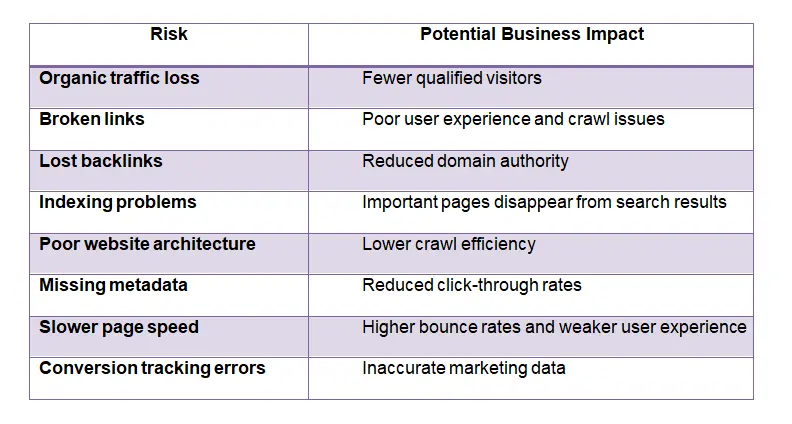
Not every redesign leads to these problems. Most issues occur when technical SEO planning is delayed or overlooked.
What to Monitor Immediately After Website Redesign Launch?
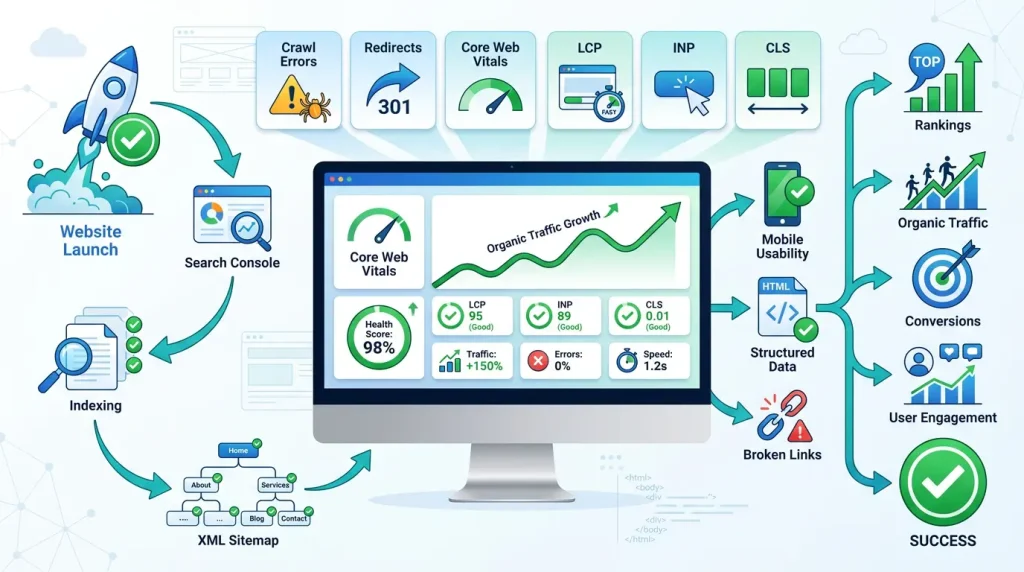
Just as important as the planning stage are the weeks that follow a redesign. Continuous monitoring assists in the early detection of technical problems before they have an impact on user experience, traffic, or rankings.
Instead of assuming everything is working correctly, monitor key SEO signals daily during the first few weeks.
1. Google Search Console Checks After Website Redesign
Google Search Console provides the fastest indication of how Google is interacting with your redesigned website. It should become your primary monitoring tool immediately after launch.
Review the following regularly:
- Indexing status.
- Coverage reports.
- Submitted XML sitemap.
- Crawl errors.
- Redirect issues.
- Manual actions.
- Mobile usability.
- Structured data reports.
Don’t panic if indexed page counts fluctuate slightly during the first few weeks. Google often needs time to process significant website changes.
2. Monitor Core Web Vitals After Website Redesign
Redesigning a website can either increase or accidentally decrease its performance. After launch, monitoring Core Web Vitals helps ensure that customers have the quick, responsive experience you had in mind.
Pay attention to metrics such as the following:
- Largest Contentful Paint (LCP).
- Interaction to Next Paint (INP).
- Cumulative Layout Shift (CLS).
Improving these metrics benefits both user experience and long-term website performance optimization.
3. Track Rankings, Traffic, and Crawl Errors
Keeping an eye on rankings by itself doesn’t give the whole picture. To figure out how the redesign is going, you need to analyze several performance metrics collectively.
Track:
- Organic traffic trends.
- Keyword rankings.
- Landing page performance.
- Crawl errors.
- Redirect errors.
- Broken links.
- Conversion rates.
- User engagement metrics.
Before making major changes, look into the root cause if any pages show unexpected downtime.
Is SEO Volatility Normal After a Website Redesign?
Yes. Some level of SEO volatility is normal after a website redesign, even when the project follows best practices.
Scrolling through pages, processing redirects, evaluating new content, and understanding structural changes to your website all take time for search engines.
This process can also temporarily affect your AI Overview visibility as AI search systems reassess your updated content and site structure.
During this time of change, you might observe:
- Temporary ranking fluctuations.
- Small traffic declines or increases.
- Changes in indexed page counts.
- Gradual keyword movement.
- Crawling activity increasing.
The length of this transition varies depending on factors such as:
- The size of the website.
- The number of URL changes.
- Crawl frequency.
- Technical implementation quality.
- Content changes.
Proactive monitoring is just as vital as patience. Businesses that find and fix problems early rather than waiting for rankings to improve on their own are usually the ones that recover the fastest.
Common Website Redesign SEO Mistakes
Most SEO issues after a website redesign are preventable. They usually result from overlooked technical details rather than Google’s algorithm.
1. Changing URLs Without a Redirect Plan
Changing URLs without implementing 301 redirects is one of the fastest ways to lose valuable search visibility.
Before launch, compare every old URL with its replacement. Instead of completely removing a page that has been moved or renamed, generate a comparable 301 redirect.
2. Ignoring Internal Links
Internal links should always be reviewed during a redesign, even if your URLs remain the same.
Look for:
- Links pointing to redirected pages.
- Broken navigation links.
- Orphan pages with no internal links.
- Incorrect breadcrumb navigation.
- Missing contextual links between related content.
A well-planned internal linking strategy improves crawlability, strengthens topic relationships, and helps visitors discover additional pages naturally.
3. Forgetting XML Sitemap Submission
An updated XML sitemap helps search engines discover your redesigned website more efficiently.
Although internal links allow Google to locate sites, using Google Search Console to submit a new sitemap speeds up the crawling process.
Keeping an eye out for any warnings or indexing problems in Google Search Console’s sitemap report is also a good idea.
4. Blocking Search Engines by Mistake
One surprisingly common launch-day error is unintentionally stopping search engines from scanning your website.
Teams frequently prevent indexing on the staging environment during development in order to prevent duplicating material. When those limitations are applied to the live website, issues emerge.
Before going live, confirm that:
- Important areas of the robots.txt file are not blocked.
- On pages that need to show up in search results, meta robot tags are not set to zero index.
- The production site no longer has password protection.
- Rather than pointing to the staging site, canonical tags point to the live domain.
5. Skipping Technical SEO Validation
Technical SEO must be thoroughly evaluated before a redesign can be considered successful. Launching without validation raises the possibility of undetected problems that could take weeks to find.
Many companies believe that if a website “looks right,” everything is operating as it should. In reality, some of the most damaging SEO problems are invisible to people but extremely important to search engines.
If technical SEO issues are delaying your website’s performance, our basic website SEO services can identify and fix them before they impact your rankings.
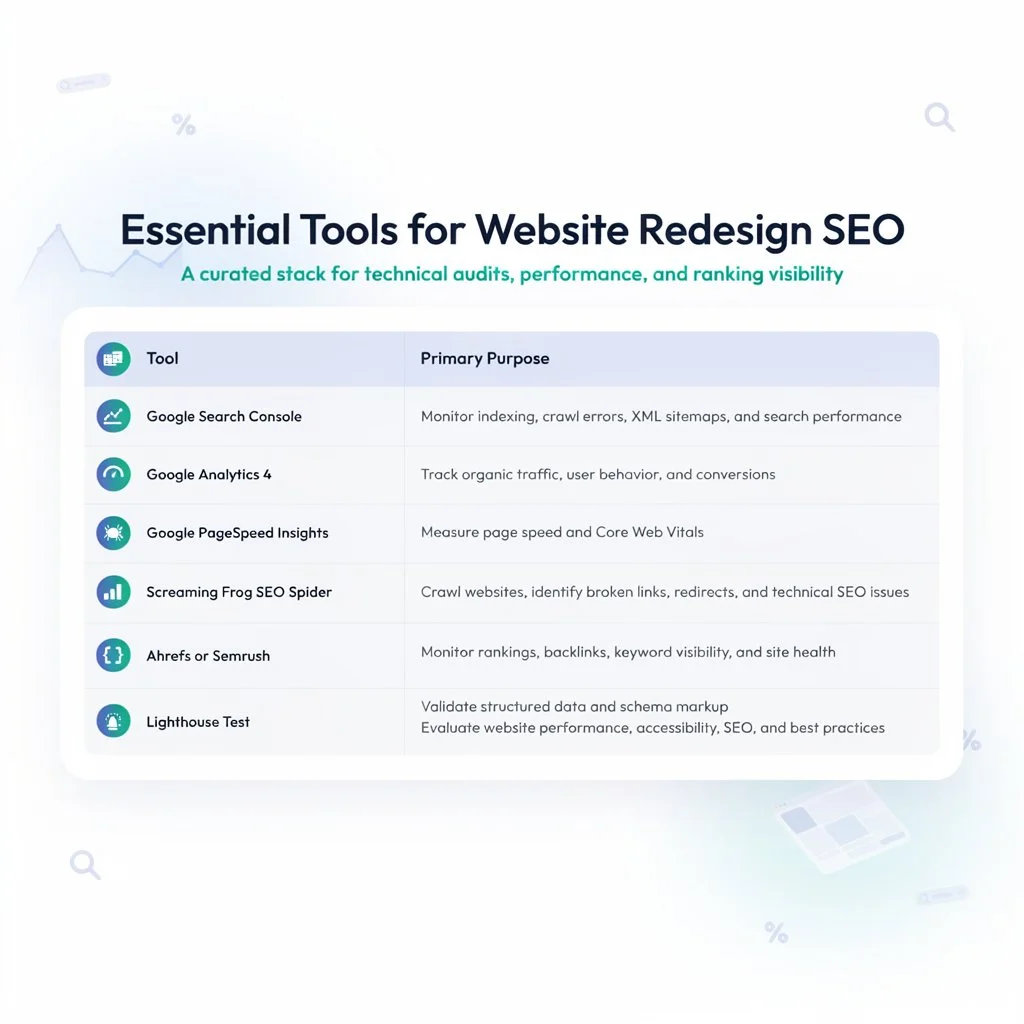
Essential Tools for Website Redesign SEO
Final Thoughts
For a redesign to be effective, maintaining the search awareness you’ve already acquired is more necessary than updating your appearance. By adding SEO into every stage of the website redesign process, you can maintain ranks, retain organic traffic, and create a faster, more user-friendly website. With careful planning and ongoing monitoring, your redesigned website will be well-positioned for long-term growth.
If you’re unsure how to redesign your website without losing rankings or organic traffic, our professional SEO services can help you plan and execute a search-friendly migration.
FAQs
How do I redesign a website without losing SEO?
The first step should be a thorough SEO audit. It is necessary to maintain high-performing content, map out old URLs to new ones, apply 301 redirects, maintain internal links, optimize technical SEO elements, and keep a careful eye on Google Search Console after launch.
Should I change URLs during a website redesign?
Only where there is a clear organizational or business justification. Because maintaining current URLs is usually the safest form of action because it lowers migration risks and protects search equity.
What is a 301 redirect in SEO?
Users and search engines are automatically redirected from an old URL to a new one by a 301 redirect, which is a permanent redirect.
How long does SEO take to recover after a website redesign?
While larger or more complex redesigns could take several months, some websites stabilize in a matter of weeks. The size of the website, the total amount of modifications, the frequency of crawls, and the quality of the implementation all affect recovery.